Showing posts with label spy. Show all posts

Wednesday, April 15, 2009

Tag&Rename 3.2


-- 100% clean (No Viruses, No Adware, No Spyware)
with serail key and Crack
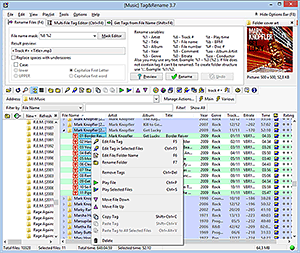
Tag&Rename is a handy management utility designed for mp3, wma, ogg, mp4 (m4a, m4p) and flac music files.

With Tag&Rename you can quickly and easily rename your music collection using the embedded tag data within music files, write new or edit existing tag information, create tags based on file names, get song information from the freedb server, or import it from the amazon.com. Tag&Rename supports all popular tag standards used by software and hardware players. This program is a very useful playlist editor with recursive sub folders support and a unique file list which show all your files in a real folders structure.

Tag&Rename is the only music organizer and tag editor which support all popular files formats:
.mp3 - ID3v1, ID3v1.1, ID3v2.2, ID3v2.3 and ID3v2.4 tags
.mpc (MusePack), .ape (Monkey's Audio), .ofr (Optim Frog) and .wv (Wav Pack) - APEv1 and APEv2 tags
.wma, .asf and .wmv (Windows Media) - Windows Media tags
Apple iTunes and iPod aac (.m4a and .m4p) and .mp4 files
Windows Media (.wma, .asf and .wmv files)
.ogg, .flac - vorbis comment tags

Tag&Rename have full support the following tag frames in all supported music formats: Artist, Album, Title, Year, Genre, Comment, Composer, Original Artist, Copyright, URL, Encoded by, Track #, Disc #, Rating, Mood, BPM, Cover art, Lyrics, Orchestra or band, Conductor, Lyricist, Original Lyricist, Label, Radio station name, Audio file information web page, Artist web page, Audio source web page, Radio station web page, Buy CD web page, ISRC #, Catalog #, (in ID3v2 tags Tag&Rename also support PCDJ software frames).

Key features:
Rename music files according it tag information: easily rename files using templates individually or whole directories at a time, preview changes before renaming or undo the last renaming process, rename the folder (including sub folders) containing your music files, and manually edit files and folders names.
Multi-file or manual tag editors: edit tags for multiple or single files, you can add cover art to all album files with a few clicks, fill-in tag fields using the file name.
Freedb support: gets tag information for full music albums automatically in seconds using the freedb Internet server.
Amazon.com support: search and import album information and cover art from the www.amazon.com server to files tags.
Text case conversion functions: convert case or capitalize the first letter of each word within file names or tags.
Tags synchronization wizard: you can synchronize ID3v1 and ID3v2 tag data .
Export wizard can export your music information into any format (csv, xml, html and tab delimited text).
Rename music files folder according to tags information.
Full support for files drag and drop like in Windows Explorer.
M3u play lists: create m3u play lists using the unique Quick Save Play list feature.
Play music files: listen to your music files using your favorite music player.
Explorer shell extensions: Tag&Rename can be added to the context menu of MS Explorer so that you can access T&R faster (right-click mouse) from the MS File Manager.
Tag&Rename is very easy to use and highly configurable. In addition, it has helpful notes and descriptions of menu commands built into the interface to help speed up your understanding and use of the program.

Tag&Rename supports many files and tags standards in an easy and intuitive way, so you can work with music metadata and not have to think about files codecs and tags versions - Tag&Rename does it all.

System requirements:
Pentium 200 MHz processor or better
Windows 95/98/Me/NT/2000/XP
16 MB RAM
2.5 MB hard drive space
Sound card

Click Here For Download With Crack (format rar file)

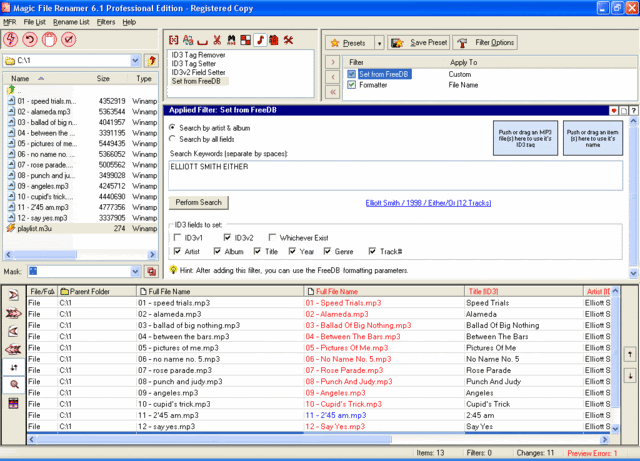
Magic File Renamer v6.12 Professional Edition

Magic File Renamer v6.12 Professional Edition With Crack


-- 100% clean (No Viruses, No Adware, No Spyware)

The most comprehensive and flexible file-renaming and ID3 tagging software for Windows.
Supplied with 36 filters which you can use to perform almost any renaming task you could think of.
Supports MP3 ID3 tags read/write, and online music albums information retrieval from freedb.org.
Supports reading information from image files, and metadata in various standards from JPEG images.
Supports changing text files contents by applying any text filter on them.
Supports real-time preview, log and undo for any changes made.
Supports presets and console mode for automatic batch renaming from command-line.

Click Here For Download in (Rar Format)


Flash Album Creator Version 1.7

Flash Album Creator Version 1.7

-- 100% clean (No Viruses, No Adware, No Spyware)

Flash Album Creator - Over View
Flash Album Creator is a powerful slide show builder. It enables you to transfer a group of pictures into your own slide show in a breeze. You can also add narration, background music, text, transition animation effects and pan/zoom animation effects as you wish. The output slide shows are in the format of Adobe Flash or EXE. You can distribute them onto web sites, send them by e-mails, or burn them into CDs to share with others. If you have no web development experience, Flash Album Creator can help you breeze through the creation of a slide show in just several minutes. What you should do is simply to add pictures and select slide properties. If you are an experienced web designer, Flash Album Creator can also be a good choice to help you make slide shows for clients to save time and effort.


Key Features Easy to Use You can make a Flash slide show in several minutes just by adding photos and setting slideshow properties. No Flash programming required at all! Full Customizable You can fully customize the properties of individual slides as well as the whole web slideshow. These properties include: different narration, text, transition animation effect, pan/zoom animation effect for each slide, and the size, background color, link address and background music, etc., for the whole slide show.


E.M. Total VIDEO Converter 3.14

E.M. Total VIDEO Converter 3.14
-- 100% clean (No Viruses, No Adware, No Spyware)


Convert to DV (.dv)
Convert to WMV (.wmv)
Convert to HD Mpeg TS (.ts)
Convert to ASF (.asf)

Audio Formats:

Convert to MPEG audio(.mp3, mp2)
Convert to Ms WAV (.wav)
Convert to Ms WMA (.wma)
Convert to OGG (.ogg)
Convert to Amr audio (.amr)
Convert to AC3 (.ac3)
Convert to SUN AU format (.au)
Convert to m4a (mp4 audio)
Convert to aac (aac audio)
Convert to mmf (mmf audio)
Convert to Flac (flac audio)


Updated History:

E.M. Total Video Converter V3.12 New Features:
1 Brand-new GUI
2 The file size can be more than 4G Bytes
3 Support DIVX 50 with divx.com codec
4 Support Nellymoser codec audio codec for flv format video
5 Brand-new GUI for picture slide show

E.M. Total Video Converter V3.11 New Features:

1 Add a tool Total Flv Sniffer for automatically downloading flv
2 New method for video and audio syncing.
3 Solve the problem no audio for ripping DVD in some condition.
4 Solve the DVD subtitle problem while ripping CIF format DVD
5 Flv seek accurately
6 Enhance importing OGM format compatibility
7 Enhance importing RMVB,RM format compatibilityE.M. Total Video Converter V3.10 New Features:

1 Photos slide show
Photos slide show turns your photos into slideshows and music with more than 300 photos special transition effect that help you easily make amazing picture-in-picture entertaining photo slideshows.Then output your video to disc, the Internet, iPod, PSP, Smartphones, PDAs and other mobile devices or even burns it to standard DVD players. Copy-saving & Watching & sharing your slideshows anywhere anytime.

2 Importing lots of subtitle file formats, including .srt . Sub .ssa .ass .smi .psb .tex .idx etc;

3 Importing WINAMP plugins audio

4 Supports generating ASF,WMV (for ZUNE,XBOX360),WMA video and audio formats;

5 Supports generating Sony Ericsson mobile video formats;

6 Unique feature: Supports generating some kinds of digital camera formats,such as KODAK DC, Samsung L55W, Casio Z600;

7 Supports generating MPEG TS stream subtitle files formats ;Total Video Converter

V3.0 beta New Features:

1 Integrate a powerful media player--Total Video Player;
2 Integrate a powerful burning tool that can burn the converted audio and video files to Audio CD/VCD/SVCD/DVD;
3 Supporting outputing flv video with metadata;
4 Easy settings for the output video with high/normal/low quality;
5 Importing and converting Nelly Mosser flv audio with high speed;
6 Converting the Flv video with VP62 video codec;
7 Supporting FLAC audio format;
8 Supporting DV video format;

Total Video Converter 2.60 New Features:
1 Support using with command line
2 Output settings can be saved now
3 Combine several video and audio files to one video file
4 Demultiplex or extract video and audio
5 Multiplex video and audio to one file
6 Rip audio CD automatically .

Click Here Download in (Rar Format)

Rising PC Doctor v.6.0.0.9

Rising PC Doctor v.6.0.0.9
Rising PC Doctor, Spyware and Trojan Removal, Online Security Protection Expert
With its seven key functions of automatic malware analysis, immunization of USB storage devices, ability to repair Microsoft Internet Explorer & Windows, Trojan Behavior Detector & Blocker, protection against malicious websites, Internet Explorer protection and Trojan Download blocker, Rising PC Doctor will greatly enhance your computer security protection against malware and cyberthreats.

Key Features

1, Trojan Behavior Detector & Blocker
Rising PC Doctor can Detect the majority of Trojans and even great number of other malware upon startup before they can execute their malicious function. It will significantly increase your protection from cyber threats.

2, Trojan Download Blocker
After successful Infection, many viruses automatically start to download large numbers of Trojans and other malware. The Trojan blocking technology of Rising PC Doctor ensures that even an infected computer will not download any other viruses and stop the spreading of whole families of Trojans.

3, Automatic Malware Analysis
Rising PC Doctor can automatically scan for potentially unknown malware. With the permission of users, suspicious malware will be automatically transferred to Rising�s Automated Malware Analyzer for detailed analysis. The user will be informed about the result of the analysis and can quickly react to the new threats for which conventional protection is not yet available. Analysis metadata collected by the community of Rising users (Rising Cloud Security) will be stored in the Rising Security Database, providing up-to-date information about cyber security.

Main Functions


1. Completely Redesigned Vulnerability Scan
2. Strong Ability to Repair Microsoft Internet Explorer & Windows
3. Powerful Process and Startup Management
4. Advanced Tools for Experienced Users
Other Functions
1. Spyware Scan & Removal
2. Strong Protection against Current Trojans
3. Privacy Protection


Click Download

RegFreeze v.5.6.1

RegFreeze v.5.6.1

RegFreeze is an effective tool to counteract spyware modules trying to install themselves onto your computer. With RegFreeze, you can feel safe and secure while surfing the Internet.

Does your browser suddenly change the start page?
Does your browser's search page sometimes lead to unwanted locations?
Does something weird happen to your browser after visiting an ordinary web site?
Start using RegFreeze today and solve all these problems once and for all!
Most spyware changes your browser's start page or search page. RegFreeze is intended to prevent the destructive consequences of spyware. RegFreeze's primary objective is to prevent any important preferences (such as your browser's start page etc.) from being changed without your knowledge.

RegFreeze detects changes in a timely manner and notifies you about them (or, if an automatic mode is enabled, processes changes automatically).

RegFreeze Spyware scanner will clean your system quickly and effectively! Use RegFreeze and you will forget about spyware forever!

Click Download

Sunday, April 12, 2009

5 ways to speed up your PC

By following a few simple guidelines, you can maintain your computer and keep it running smoothly. This article discusses how to use the tools available in Windows to more efficiently maintain your computer and safeguard your privacy when you’re online. Free up disk space
By freeing disk space, you can improve the performance of your computer. The Disk Cleanup tool helps you free up space on your hard disk. The utility identifies files that you can safely delete, and then enables you to choose whether you want to delete some or all of the identified files.

Use Disk Cleanup to:• Remove temporary Internet files.
• Remove downloaded program files (such as Microsoft ActiveX controls and Java applets). • Empty the Recycle Bin. • Remove Windows temporary files. • Remove optional Windows components that you don’t use. • Remove installed programs that you no longer use.


Tip: Typically, temporary Internet files take the most amount of space because the browser caches each page you visit for faster access later.

To use Disk Cleanup
1. Click Start, point to All Programs, point to Accessories, point to System Tools, and then click Disk Cleanup. If several drives are available, you might be prompted to specify which drive you want to clean.


2. In the Disk Cleanup for dialog box, scroll through the content of the Files to delete list.


Choose the files that you want to delete.

3. Clear the check boxes for files that you don’t want to delete, and then click OK.

4. When prompted to confirm that you want to delete the specified files, click Yes.


After a few minutes, the process completes and the Disk Cleanup dialog box closes, leaving your computer cleaner and performing better.


Speed up access to data Disk fragmentation slows the overall performance of your system. When files are fragmented, the computer must search the hard disk when the file is opened to piece it back together. The response time can be significantly longer.

Disk Defragmenter is a Windows utility that consolidates fragmented files and folders on your computer’s hard disk so that each occupies a single space on the disk. With your files stored neatly end-to-end, without fragmentation, reading and writing to the disk speeds up.

When to run Disk Defragmenter
In addition to running Disk Defragmenter at regular intervals monthly is optimal there are other times you should run it too, such as when:
• You add a large number of files.

• Your free disk space totals 15 percent or less. • You install new programs or a new version of Windows.
To use Disk Defragmenter:
1. Click Start, point to All Programs, point to Accessories, point to System Tools, and then click Disk Defragmenter.


Click Analyze to start the Disk Defragmenter.
2. In the Disk Defragmenter dialog box, click the drives that you want to defragment, and then click the Analyze button. After the disk is analyzed, a dialog box appears, letting you know whether you should defragment the analyzed drives.

Tip: You should analyze a volume before defragmenting it to get an estimate of how long the defragmentation process will take.
3. To defragment the selected drive or drives, click the Defragment button. Note: In Windows Vista, there is no graphical user interface to demonstrate the progress—but your hard drive is still being defragmented.

After the defragmentation is complete, Disk Defragmenter displays the results.
4. To display detailed information about the defragmented disk or partition, click View Report.
5. To close the View Report dialog box, click Close.
6. To close the Disk Defragmenter utility, click the Close button on the title bar of the window.


For more information on disk defragmentation, Link
Detect and repair disk errors

In addition to running Disk Cleanup and Disk Defragmenter to optimize the performance of your computer, you can check the integrity of the files stored on your hard disk by running the Error Checking utility.

As you use your hard drive, it can develop bad sectors. Bad sectors slow down hard disk performance and sometimes make data writing (such as file saving) difficult, or even impossible. The Error Checking utility scans the hard drive for bad sectors, and scans for file system errors to see whether certain files or folders are misplaced.

If you use your computer daily, you should run this utility once a week to help prevent data loss.

To run the Error Checking utility:1. Close all open files.
2. Click Start, and then click My Computer.
3. In the My Computer window, right-click the hard disk you want to search for bad sectors, and then click Properties.
4. In the Properties dialog box, click the Tools tab.
5. Click the Check Now button.
6. In the Check Disk dialog box, select the Scan for and attempt recovery of bad sectors check box, and then click Start.


7. If bad sectors are found, choose to fix them.


Tip: Only select the “Automatically fix file system errors” check box if you think that your disk contains bad sectors.
Protect your computer against virus and spyware

A computer virus is a computer program that can copy itself and infect a computer without the permission or knowledge of the owner. The term “virus” is also commonly but erroneously used to refer to other types of malware, adware and spyware programs that do not have the reproductive ability. A true virus can only spread from one computer to another (in some form of executable code) when its host is taken to the target computer.

Spyware collects personal information without letting you know and without asking for permission. From the Web sites you visit to usernames and passwords, spyware can put you and your confidential information at risk. In addition to privacy concerns, spyware can hamper your computer’s performance.

To combat spyware, you might want to consider my personal recommendation ESET NOD32 Internet Security. Alternatively, there are other free antivirus and anti-spyware software programs available.
Learn all about Tweaking

Download TuneUP Utilities to do all the above all in one place with a lot of other tweaking like Registry cleaning, registry defragmenting and alot more. You can also use CCleaner or TweakUI as a free alternative.